Video Gallery for Wear OS
- 3.2
- Rating
- 100.00K
- Installs
- Free
- Price
 Analysis by App-foxy
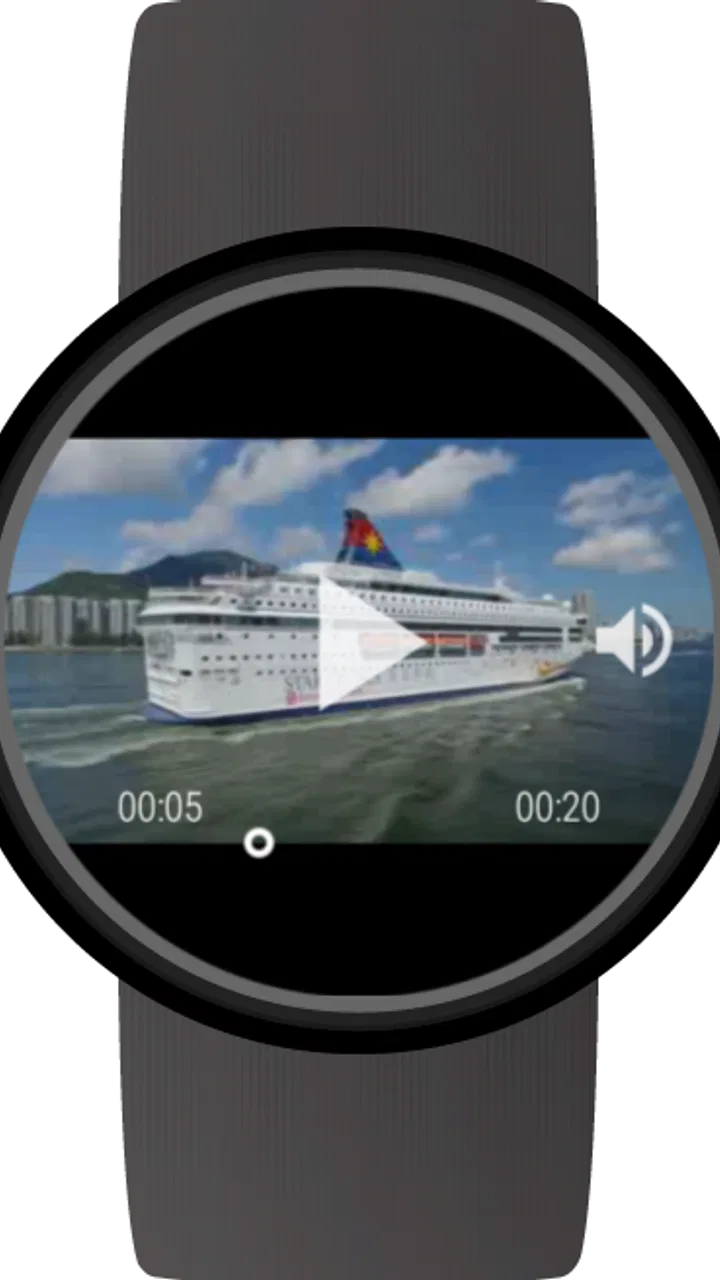
Watching a short clip on a smartwatch is a very different experience from watching video on a phone. The screen is tiny, storage and controls are more limited, and even simple tasks can feel awkward when your other hand is busy. Video Gallery for Wear OS takes a focused approach to that problem: it gives your Wear OS watch a place to browse and play video files instead of treating the watch only as a companion display. I tested it with that narrow purpose in mind, and my impression is that it works best as a personal, occasional viewer rather than a replacement for a phone or tablet.
That distinction matters. This is a free app from appfour in the Video Players & Editors category, and its current version is 1.0.210304. It has passed the early-experiment stage in the sense that the app has been available since August 15, 2016, but its appeal still depends heavily on whether you genuinely want video access on your wrist. With an average rating of 3.2 from around 1.3 thousand ratings and more than 100 thousand installs, it clearly has an audience, although the response is mixed enough to suggest that setup, watch compatibility, and expectations play a major role in the experience.
How Video Gallery fits into everyday Wear OS use
The most natural way to use Video Gallery for Wear OS is for short, personal clips that you want close at hand. I can imagine keeping a demonstration, a memorable family recording, a quick reference video, or a clip captured earlier on the phone and checking it without taking the phone out of a pocket. It is also useful when the watch is the device you already have access to, such as during a brief wait, while traveling light, or when reaching for a larger screen would be inconvenient.
You May Also Like

 Blood Strike: 2.5 Anniversary
Blood Strike’s Loadouts Turn Every Drop Into a Tactical Gamble
A close look at Blood Strike’s custom loadouts: how fast access to signature weapons reshapes its battle royale rhythm, rewards preparation, and narrows the gap between fights.

 Pandora - Music & Podcasts
Pandora’s Music Is Easy to Start, but Harder to Recover
Pandora’s strength is its low-effort path from a seed to a station. Its weak spot is how much confidence it asks you to place in connection, setup, and quiet recovery.

 8 Ball Pool
 Is Built on Rivalries, Rematches, and Routine
A close look at the rivalries, rematches, shared routines, and unanswered safety questions that turn a quick pool match into a persistent mobile community.

 Samsung Music
’s Quiet Strength Is Playing What You Already Own
Its reach comes less from spectacle than from dependable access to a personal library. That simplicity is both the app’s strongest retention engine and its ceiling.

 AccuWeather: Weather Radar
AccuWeather Review: A Quick, Clear Forecast for Everyday Decisions
For everyday plans, the best forecast is the one you can understand quickly. AccuWeather makes rain timing, radar, and local conditions easy to act on, with a few trade-offs.

 Hill Climb Racing
Why Hill Climb Racing Still Turns Crashes Into One More Run
A tiny car, a bumpy hill and one more upgrade: Hill Climb Racing keeps resurfacing because its simple chaos makes every near-miss feel personal.
More From Our News Desk
View All News


The watch format changes how I judge the app. On a phone, I expect a video player to make browsing effortless, handle many file types, and provide comfortable controls. On a watch, the first question is simpler: can I find the clip I need without fighting the small display? A gallery-style presentation is more practical than opening files through a general file manager, because the visual preview helps me recognize a clip faster than a filename alone. That is a meaningful advantage for a wrist-based library, where typing or scrolling through long names is especially unpleasant.
I would not install it expecting a miniature streaming service. The store summary positions it as a video gallery for a Wear OS smartwatch, and that is the right way to understand it. Its value is local, personal access rather than replacing services designed around online catalogs, subscriptions, recommendations, or large screens. If your goal is to watch long episodes, follow tutorials in detail, or enjoy cinema-quality playback, your phone remains the more sensible choice.
The app is free to install, with in-app purchases ranging from $1.49 to $14.99 per item. That makes trying the basic experience relatively easy, but I would still decide what role the watch will play before spending money inside the app. A wrist video viewer is a specialized convenience, so the purchase is easier to justify for someone who regularly needs quick access to clips than for someone who is merely curious about the novelty.
The first-use experience and the small-screen trade-off
Browsing video on a watch requires a different rhythm. I found that the gallery is most useful when the collection is kept tidy and the clips are short enough to identify quickly. The less organized the library, the more the small display becomes a bottleneck. This is one of the less obvious practical lessons with a watch video app: the quality of the browsing experience depends almost as much on how you prepare the files as on the player itself.
Before transferring anything, I would create a small selection rather than copying an entire phone library. Use clear filenames, remove duplicate clips, and keep only videos that make sense away from a larger screen. This turns the watch into a useful pocket-sized reference rather than a cramped archive. It also reduces the time spent scrolling, which is more tiring on a watch than on a phone.
Touch controls are another consideration. A watch face leaves little room for buttons, so pausing, seeking, and selecting the right item require more precision than they would on a phone. I prefer clips that do not need constant scrubbing. A short video that can be watched from beginning to end is a much better match than a long recording where I need to jump between sections.
That makes the application surprisingly suitable for visual reminders. For example, I could keep a short clip showing how to adjust a piece of equipment, demonstrate a stretch, or explain a process I occasionally forget. In that situation, I do not need a full media center. I need a file I can locate quickly, play briefly, and close. The watch's limitations become less important because the task itself is small.
What the current version means for existing users
The current version, 1.0.210304, is the clearest practical reference point for anyone deciding whether to install the app today. Since the product has been available for years, existing users may already have a familiar workflow and a library prepared for the watch. For them, the most important question is not whether the concept is interesting but whether the present build continues to work comfortably with their particular Wear OS setup.
I would approach updates conservatively when an app is tied closely to a wearable. A phone application can often be replaced temporarily if something changes, but a watch utility is usually part of a specific routine. After updating, I would test the clips I use most, confirm that the gallery still opens as expected, and check playback before relying on it during travel or work. That is not a criticism of this app alone; wearable software is more sensitive to device combinations than many ordinary phone apps.
For someone installing it for the first time, the version number is less important than the workflow it supports. The app has a long release history, but that does not automatically make it the best option for every current watch. I would treat compatibility and actual playback behavior on your own device as decisive. A video app can look promising in a listing and still be a poor fit if your watch has too little room for the clips you want or if the controls feel uncomfortable.
Existing users should also think about why they keep the app installed. If it is being used for one dependable clip, the simplest setup may remain the strongest. If the library has grown into dozens of files, the original convenience can disappear under scrolling and selection. In that case, pruning the collection may improve the experience more than searching for a new setting. The watch is at its best when it acts as a quick-access tool, not when it tries to imitate a full media library.
Three workflows that reveal its real strengths
The first useful workflow is the “prepared reference” setup. I would select a handful of videos on the phone, give them short descriptive names, and transfer only those files intended for watch viewing. This avoids the common mistake of treating the watch like a second phone. The benefit is speed: when I need a particular clip, recognition is easier and the gallery stays manageable.
The second is the “offline moment” setup. A local clip can be more dependable than an online service when connectivity is inconvenient, provided the file is already available to the watch. That makes the app potentially useful for travel or places where I do not want to depend on a network. The trade-off is that preparation happens in advance, so it is not ideal for discovering new online content on demand.
The third is the “hands-busy check” setup. Imagine repairing something, setting up a device, or following a short movement demonstration. Pulling out a phone may be inconvenient or expose a larger screen to dirt, drops, or accidental contact. A watch-mounted clip can be enough to confirm the next step. I would not use it for detailed instructions with tiny text, but for a visual cue or short sequence it can be surprisingly effective.
These workflows also show why the application is more specialized than its simple name suggests. It is not merely about watching video anywhere. It is about choosing the right video for a very small display and a very short interaction. The best results come from editing the library before it reaches the watch, not from expecting the app to make every video equally watchable.
Where it falls behind phones and ordinary video players
The obvious alternative is the phone's built-in gallery or a conventional video player. Those options generally offer a larger screen, easier navigation, more comfortable seeking, and better support for extended viewing. If I am sitting down to watch anything longer than a quick clip, I would choose the phone without hesitation. It is simply a better viewing device.
A streaming app is a different alternative again. Streaming services are stronger when I want discovery, a large catalog, synchronized viewing, or content I did not prepare beforehand. Video Gallery for Wear OS is more personal and more limited: it is built around files already available for the watch. That can be an advantage for privacy and simplicity, but it also means the app does not replace the convenience of searching a service from the phone.
A file manager may be preferable for people who rarely watch video and only need to open an occasional file. However, a general file manager is usually less pleasant for visual browsing. The gallery concept earns its place when thumbnails or a visual collection help me locate the right clip. If I only have one file, the dedicated gallery may feel unnecessary; if I have a carefully selected group, it becomes more useful.
There is also a social trade-off. Showing a video to another person on a watch is possible in principle, but the screen is not comfortable for shared viewing. I would use the app for private checking rather than as a way to present content. A phone, tablet, or laptop is clearly better when more than one person needs to see the details.
Limitations I would consider before installing
The small screen is the central limitation, not a minor inconvenience. Fine detail, subtitles, diagrams, and fast motion can all lose clarity. A clip that looks excellent on a phone may become difficult to interpret on a watch. I would test the actual type of content I care about instead of assuming that every video will translate well to the wrist.
Storage and transfer are practical concerns too. A watch is not the place for an unrestricted video archive, and moving large files can be frustrating if the preparation process takes longer than simply using the phone. This is why I see the app as a curated gallery. Keeping a few high-value clips is sensible; filling the watch with everything is likely to make the experience slower and less purposeful.
Battery awareness matters as well. Video playback asks more from a wearable than checking the time or reading a notification. I would avoid starting a long viewing session when the watch is already low on charge, especially if I still need it for notifications, navigation, or health-related functions later. The app is best used in short bursts, where its convenience outweighs the extra demand.
The mixed average rating of 3.2 is worth treating as a signal to keep expectations realistic. It does not tell me exactly how every user reached that opinion, but it does suggest that this is not a universally effortless experience. The app's usefulness may vary with watch model, file collection, and the user's tolerance for small-screen controls. I would install it because I have a specific wrist-based video need, not because I expect a polished phone player compressed onto a watch.
The Everyone age rating makes the app broadly approachable, but that does not change the practical audience. Children and adults can understand the basic idea, yet the best fit is still someone who owns a compatible Wear OS watch and has a clear reason to keep selected videos there. The age classification describes accessibility, not whether the format will suit a particular viewing habit.
Who should use it, and who should skip it
I would recommend trying it if you own a Wear OS smartwatch and often need a few personal clips available without reaching for your phone. It is especially appealing for reference videos, short memories, demonstrations, and offline access. People who enjoy experimenting with wearable utilities may also appreciate the unusual convenience of having a video gallery on the wrist.
I would skip it if your main goal is entertainment. Long-form viewing, detailed tutorials, streaming discovery, and shared playback all belong on a larger device. I would also skip it if you dislike preparing files manually or if your watch is already crowded with media and apps. The benefit is too specialized to compensate for a workflow you find annoying.
For current users, the smartest approach is to keep the library intentional and review it occasionally. Remove clips that no longer matter, retain the ones that solve a real problem, and test playback after significant changes to the watch or phone environment. This turns the app from a novelty into a small tool with a defined job.
What I would watch in its future development
Because the current build is 1.0.210304, I would pay attention to how future releases handle the basic wearable experience rather than expecting a completely different product. The most valuable improvements would be the ones that reduce friction: faster browsing, clearer selection on a small display, dependable handling of personal libraries, and controls that remain comfortable during short sessions.
I would also watch whether the app continues to make sense as Wear OS hardware and software evolve. A wearable video gallery must keep pace with changing screen sizes, performance levels, storage limits, and companion-device behavior. Those details determine whether a simple idea remains useful. They matter more here than adding features that make the app resemble a general phone player.
My final view is cautiously positive. Video Gallery for Wear OS is not an essential app for every smartwatch owner, and its limitations are easy to see once a clip becomes long or visually detailed. Still, when I prepare a small collection of suitable videos, the concept works: I can access a personal clip in a moment when the phone is inconvenient. Its real strength is focused, offline-style convenience on the wrist, not full-scale video entertainment.
With a free entry point, an Everyone rating, and a focused purpose, it is reasonable to try if that use case sounds familiar. Just keep the collection small, choose clips that survive the watch's tiny screen, and compare the experience honestly with your phone's gallery. For me, that is the deciding test: if the watch saves a few seconds during a real everyday task, the app earns its place. If I simply want to watch video, the larger screen wins every time.
FAQs for Video Gallery for Wear OS
01What is Video Gallery for Wear OS and what can I do with it?
Video Gallery for Wear OS is designed to let you browse and watch compatible video files directly from a Wear OS smartwatch. After installing the app and granting the requested permissions, you can access supported clips from the watch and play them on its small display. It is most useful for short personal videos, quick viewing, or entertainment when your phone is not immediately available.
02Does Video Gallery for Wear OS work with every Android smartwatch?
The application is intended for smartwatches running Wear OS, but compatibility can vary depending on the watch model, Wear OS version, available storage, screen resolution, and hardware performance. Before downloading, check that your device is officially supported and updated. Older watches may install the app but provide slower loading, limited video compatibility, or a less comfortable viewing experience.
03Can I watch videos without keeping my phone connected?
Video Gallery for Wear OS may allow you to view videos already transferred or synchronized to the smartwatch, meaning a constant phone connection is not always required for playback. However, the initial setup, file transfer, permissions, and certain synchronization features can depend on the companion phone or a wireless connection. Offline use therefore varies according to the watch and the way videos are added.
04Which video formats and file sizes are supported?
Support depends on the watch hardware and the media playback capabilities available in its version of Wear OS. Common formats may work, but high-resolution, very long, or heavily encoded videos can fail to open, stutter, or consume significant storage and battery power. For the smoothest results, use short clips with moderate resolution and verify the app’s current format requirements before transferring large files.
05Is Video Gallery for Wear OS free, and what permissions does it require?
The download and available features can vary depending on the edition listed in the Google Play Store, including whether optional purchases or advertising are included. The app may request access to media or files so it can locate and play videos on the watch. Review the permission dialog and store listing carefully, and avoid granting access that does not appear necessary for the app’s basic gallery and playback functions.
Pros
- Quickly browse videos directly from your Wear OS smartwatch.
- Simple interface designed for small screens and touch controls.
- Useful for checking short clips without reaching for your phone.
- Supports convenient on-wrist media access while traveling or exercising.
- Lightweight gallery experience with minimal setup required.
Cons
- Watching videos can drain the smartwatch battery quickly.
- Small displays make detailed or longer videos uncomfortable to view.
- Playback may depend on the watch model and available storage.
- Limited controls compared with a full smartphone video player.
- Some features may require a connected phone or compatible Wear OS version.

Video Gallery for Wear OS
Gallery